Rummy Safety: What to Do When App Permissions Change
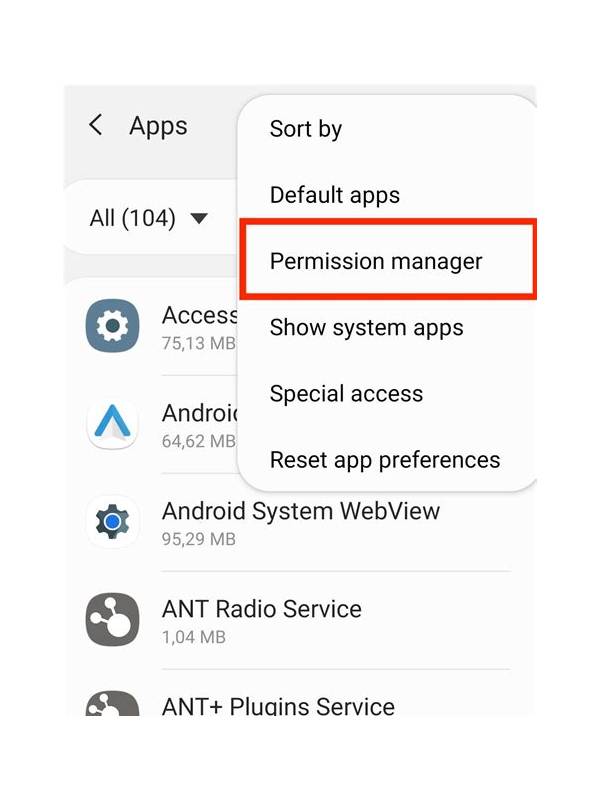
An app may request permissions during an update, but an unexpected request deserves attention. A card-game service may reasonably need network access and notifications, while access to contacts, messages, microphones, or files may require a specific explanation. Do not approve a new permission automatically just because the app worked previously.
First, pause and read the permission prompt carefully. Note what the app is requesting and whether the request appears during a normal store update or after opening an unfamiliar link. If the wording is vague, close the prompt and inspect the app’s official help information. Use the store listing or verified support channel rather than a contact supplied in a pop-up.
Review permissions in the device settings. Compare the current list with what you remember approving. Disable access that is unnecessary for the service to function, while recognizing that removing a required permission may limit a feature. If the app refuses to explain why it needs sensitive access, do not continue using it until the issue is resolved.
Check the source of the installation. Avoid files shared through random groups, shortened links, or unofficial download pages. An update that arrives outside the normal app store may be a different package pretending to be familiar. If you are uncertain, uninstall the questionable copy after preserving only necessary account information, then reinstall from a trusted source and change your password.
Protect your account while investigating. Do not enter payment details into a page opened from an unsolicited message. Review recent account activity, sign out of unknown devices, and enable available multi-factor protection. Never share verification codes or allow remote access to your phone for “support.”
If the permission change appears suspicious, report it through the official store or service channel and keep a brief record of the date and message. Follow local consumer and cyber-safety guidance if money or identity information may be affected. A small delay is safer than granting broad access under pressure. Good app hygiene means treating new permissions as a question to answer, not a button to rush past.
Keep device software current, but do not confuse an update with proof of trust. Check the developer name and package details when something looks different. On a shared device, sign out when finished and avoid saving payment details.
If a permission request follows a suspicious crash or redirect, capture the wording without exposing personal information and seek help from the device maker or official app store. Avoid downloading a “security tool” recommended by the same pop-up. Independent verification is safer than accepting an urgent fix from an unknown source.
Related Post
Rummy Discard Review: Use a Counterfactual Question
A single counterfactual question can turn an uncertain discard into a useful learning review. [...]
Rummy Guide: Count Flexible Cards Before Choosing a Meld
Counting how many cards can serve more than one purpose helps compare melds without relying [...]