Rummy Safety: Protect Personal Information on Game Accounts
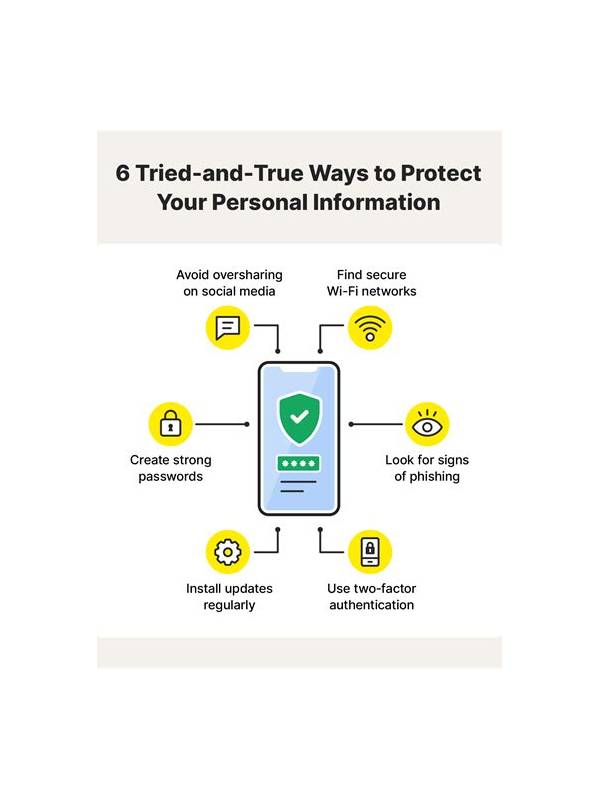
Playing online rummy involves more than understanding cards. An account may contain contact details, transaction records, device information, or identity documents. Treat those details as private and use a few basic habits to reduce avoidable risk.
Start with the official application or website for the service you intend to use. Check the spelling of the domain, the publisher name, and the permissions requested by an app. Be cautious with links received through unexpected messages or social posts. A familiar logo is not proof that a download page is genuine.
Use a unique password and protect the email account connected to the game. Turn on an available second verification factor through the provider’s normal settings. Do not share one-time codes, recovery links, or screenshots that expose account details. Legitimate support should not need a secret code sent to your private device.
Review payment and profile settings before adding funds or uploading documents. Understand why information is requested, how it is stored according to the service’s policy, and whether your local rules permit the activity. Never send identity documents to an unofficial account or to a person who contacts you privately claiming to represent support.
Keep your device updated and use a screen lock. Avoid signing in on shared devices, and sign out when a device is not under your control. If you notice unfamiliar logins, changed profile information, or unexpected transaction activity, stop using the account and contact support through a verified channel. Change credentials from a trusted device and monitor related accounts.
Security cannot guarantee that a service is trustworthy, so choose platforms carefully and keep spending limits separate from account access. Good privacy habits protect both your information and your ability to make calm decisions. If a request feels urgent, secretive, or unusually generous, pause and verify it independently before acting.
Also consider the people around you. Do not post another player’s name, payment details, or screenshots of private conversations without permission. Use a separate email address for gaming only if that improves organization, and review notifications so sensitive previews do not appear on a shared lock screen. Privacy is a continuing habit, not a single setting. Small checks before clicking, uploading, or replying can prevent a hurried mistake from becoming an account problem.
Related Post
Rummy FAQ: How Many Cards Should You Analyze at Once?
A focused scan of groups, flexible candidates, and outliers is usually more useful than inspecting [...]
Rummy Comparison: Short Notes Versus Full Hand Journals
Comparing two review styles can help players choose a record-keeping method they will actually use. [...]