Rummy Safety: Recognize Phishing Messages About Your Account
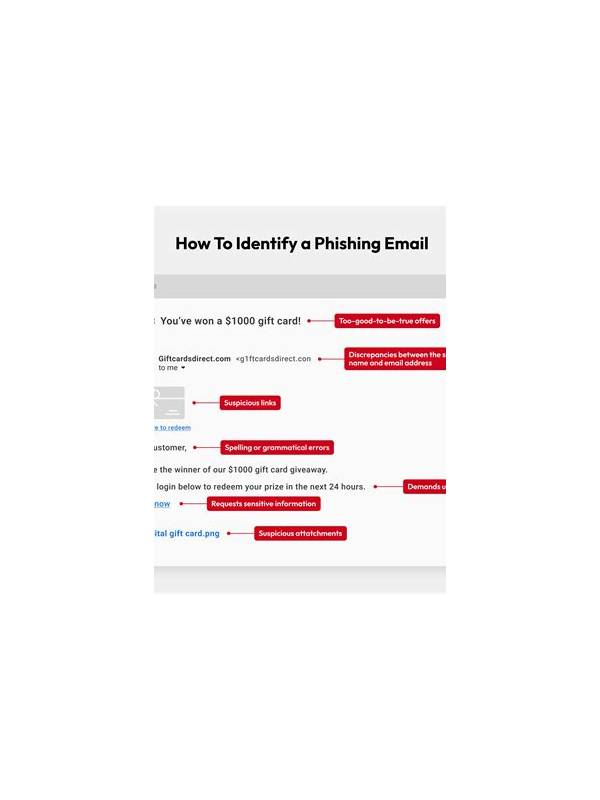
Players may receive messages claiming to offer a bonus, fix a wallet, restore access, or confirm a prize. Some are genuine notices, but phishing messages imitate familiar services to collect passwords, payment details, or verification codes. A careful pause protects both your account and your money.
Look at the request before the branding. A message that asks for a one-time code, full password, card PIN, or remote access should be treated as suspicious. Legitimate support should not need your secret login credentials. Urgency is another warning sign: “act in five minutes,” threats of immediate closure, or promises that disappear if you do not click now are designed to bypass your normal judgment.
Inspect links without opening them when possible. A misspelled domain, shortened address, extra words before the real domain, or unexpected attachment deserves verification. Do not install an APK or browser extension from a message merely because it uses a familiar logo. Open the official app or type a known address yourself, then check whether the notice appears in your account.
If you already clicked, do not continue the conversation. Close the page, change the password through the official channel, sign out other sessions if the service supports it, and contact the provider using its published support route. If payment information may have been exposed, contact the financial institution through a trusted number. Save the message as evidence, but do not forward its links to friends.
Use a separate password and enable multi-factor authentication where available. Keep your device updated and review login alerts regularly. Safe play includes account hygiene: a good offer is never worth surrendering a secret, and a real support team can be contacted independently of the message that made the claim.
Family members can agree on one simple rule: no one shares a code or installs a file from an unexpected message. If a notification looks important, verify it together through the official app. Report confirmed phishing to the service when possible, but do not include more personal information than necessary.
Remember that a phishing message can arrive after a real game or transaction, which makes it feel credible. Timing is not proof of authenticity. Verify through a channel you opened independently, and delete or block the message once any needed evidence is saved. A calm verification habit is more reliable than recognizing a logo or writing style.
Keep alerts enabled for important account changes, but route them to a device you control. If a message claims an alert was triggered, confirm it in the account rather than through its link. This small separation between notification and action makes impersonation much harder.
Related Post
Rummy FAQ: When Is a Pair a Liability?
A rummy pair becomes a liability when it blocks better routes or carries cost without [...]
Rummy Comparison: Short-Term Points and Long-Term Flexibility
Compare immediate point reduction with future flexibility when two rummy choices appear equally safe. [...]